01 — Overview
A cinema app that feels as fun as the films.
The brief
CINEVA is a fictional cinema platform. People should be able to discover movies, explore showtimes at nearby cinemas, pick their seats and book tickets, all from one app.
The challenge
Movie apps are either beautiful but slow to book, or quick but forgettable. Cineva had to make browsing feel exciting while keeping booking calm and fast. Seat selection in particular had to make it obvious which seats are free, taken or yours.
02 — Goals
Three things the design had to do.
01
Make discovery visual
Let real posters do the work. One featured film per screen, not a wall of competing cards.
02
Keep booking short
Film → time → seats → pay → ticket. Each step shows only what that decision needs.
03
Seats at a glance
Free, taken and selected seats should differ in shape and fill, not just colour.
03 — Direction
Playful references, toned down.
The references were dark social apps full of tilted photo collages, sticker badges and a loud pink accent. They had energy, but too much of it for a booking flow.
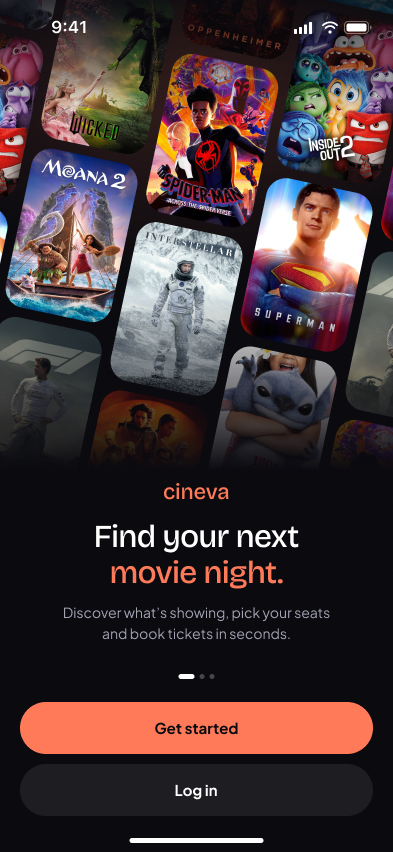
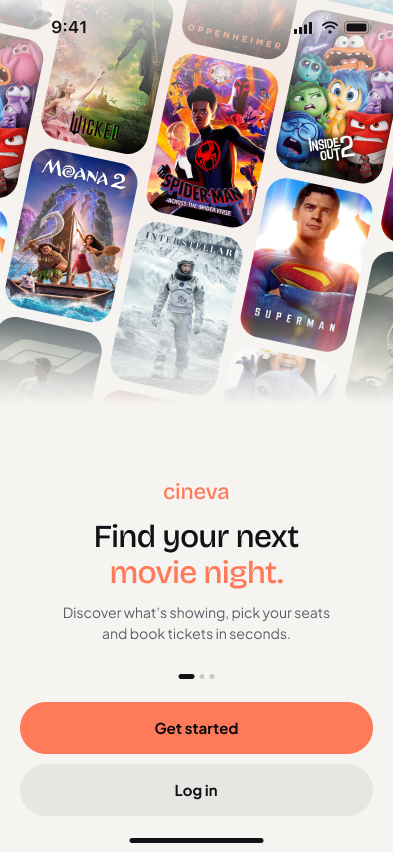
Cineva keeps the dark base and one warm accent. The collage becomes a few small moments: tilted posters on the splash screen and a sticker here and there. Real posters bring the colour.
Base
Surface
Elevated
Coral
Text
04 — Iterations
What changed after review.
The first version tried to do everything at once: an accent on every element, borders on every card and no clear place to look. These are the changes that fixed it.
Accent colour
Pink on every button, tab, chip and tag
Coral only for the main action and small highlights
One accent means one place to look.
Hero film
A moody, brown sci-fi poster
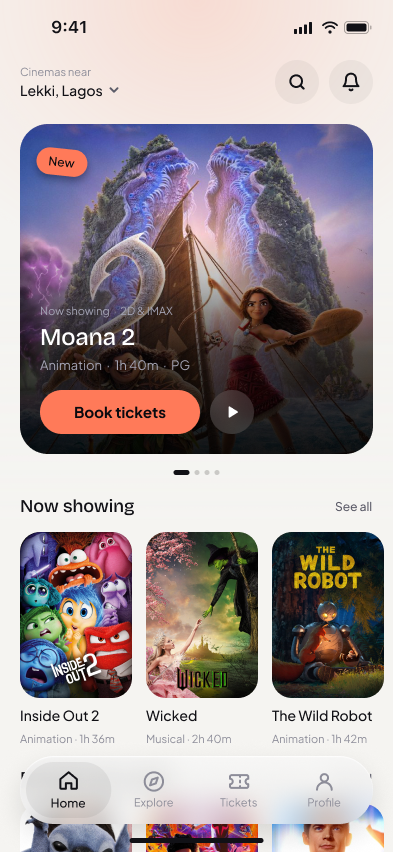
Bright family films: Moana 2, Inside Out 2
The posters set the mood of the whole screen.
Type weight
Bold and semibold headings
Regular and Medium only
Hierarchy from size and space, not shouting.
Borders
Thin strokes around every card and chip
Separation through fill contrast
Outlines now mean something: free seats.
Background
Blurred poster glow on every screen
A subtle coral glow at the top
Consistent, and never fights the posters.
Navigation
Docked, full-width tab bar
Floating glass navbar
Content scrolls under it, so the page feels bigger.
05 — User flow
Seven screens, one straight line.
01
Splash
First impression
02
Home
Pick a film
03
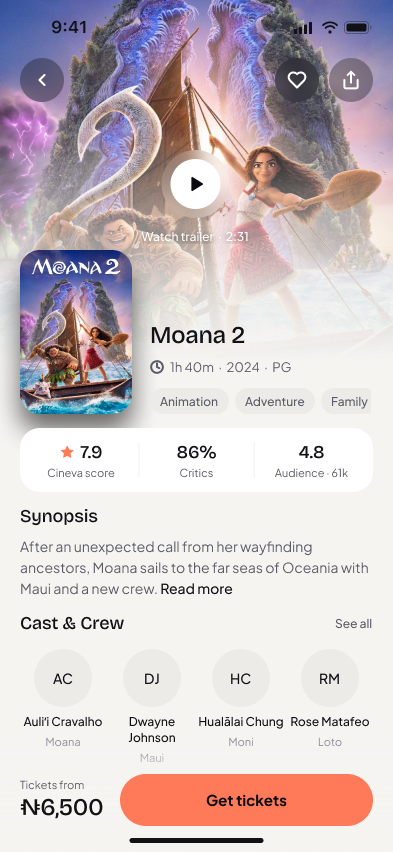
Details
Synopsis, cast, trailer
04
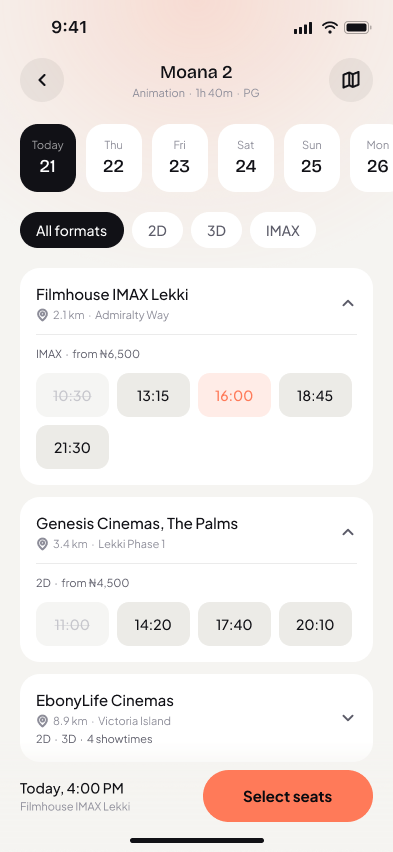
Showtimes
Cinema and time
05
Seats
Choose your seats
06
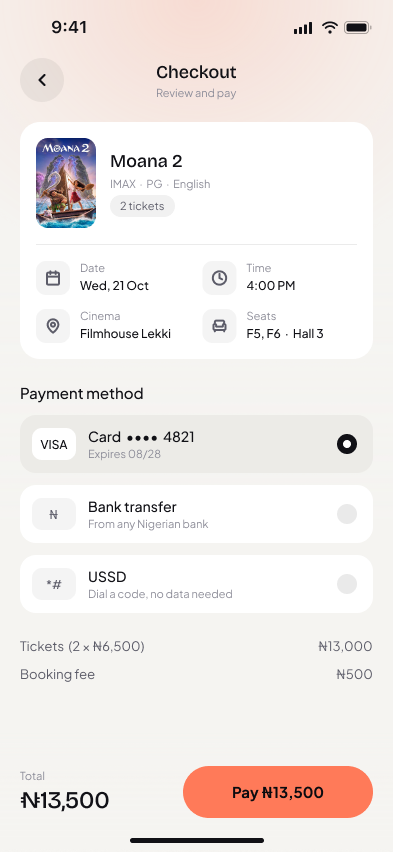
Checkout
Review and pay
07
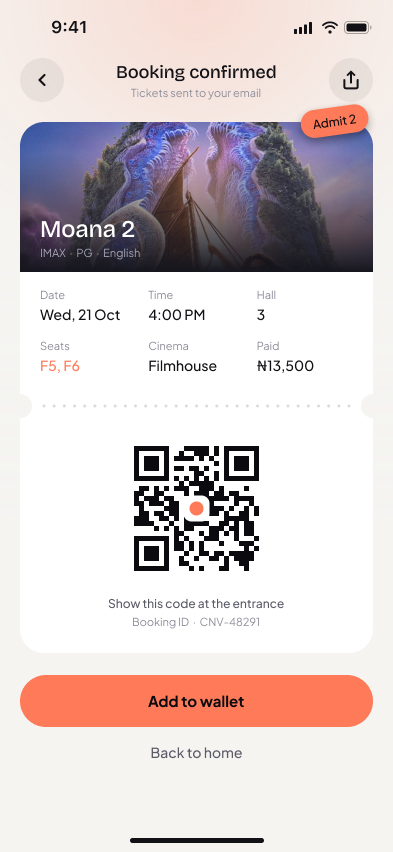
Ticket
QR at the door
Seats is the step the brief cared about most, so it gets its own deep dive below.
06 — Design system
Small kit, used everywhere.
Colour
Base
#0A0A0F / #F5F4F1
Surface
#1E1916 / #FFFFFF
Elevated
#2B2421 / #ECEBE7
Text primary
#FFFFFF / #111116
Text secondary
#A3A3B3 / #5C5C69
Coral accent
#FF7A59
Each swatch: dark mode on the left, light mode on the right. All colours live as variables with Dark and Light modes.
Type
Aa
Bricolage Grotesque Medium
Headings · 32 / 24 / 18
Aa
Plus Jakarta Sans Regular & Medium
Body & labels · 15 / 14 / 13 / 11
Components
07 — Discover
One hero. No noise.
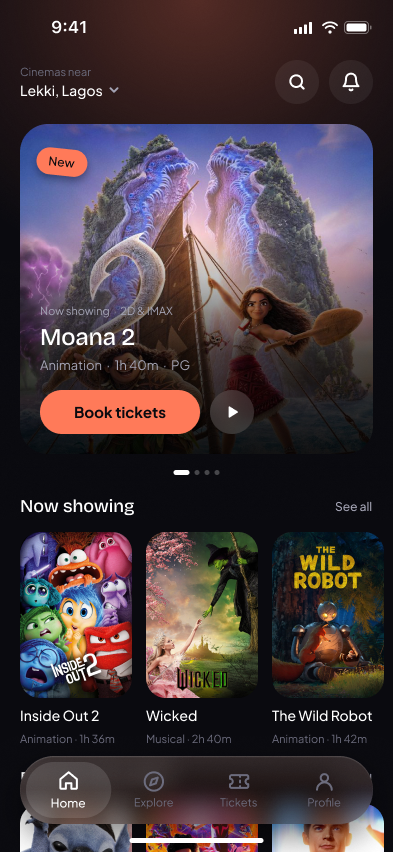
Home opens on a single featured film with one clear action. “Now showing” sits quietly underneath, and the floating glass navbar lets posters scroll beneath it.
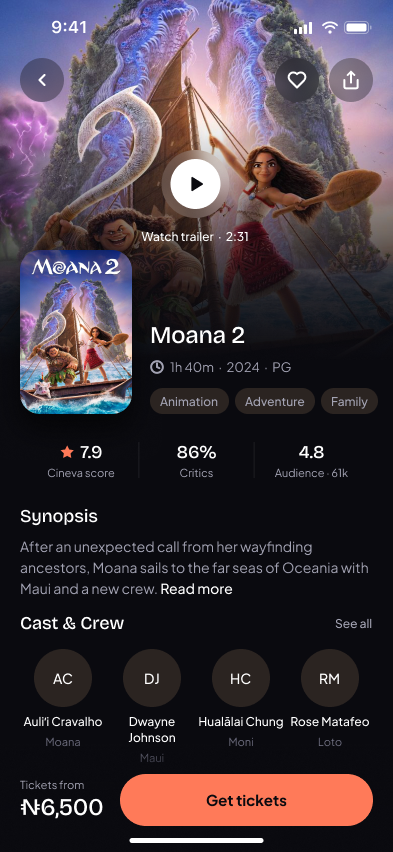
Details keeps the same rhythm: backdrop, title, a ratings strip, a short synopsis and the cast, with the price and “Get tickets” always within reach.
08 — Booking
From film to ticket in four steps.
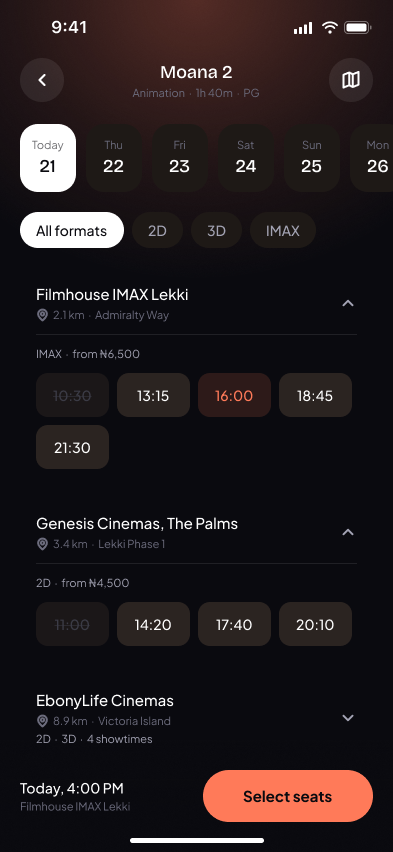
01 Pick a time
Dates up top, then cinemas with their times. Past times fade out.
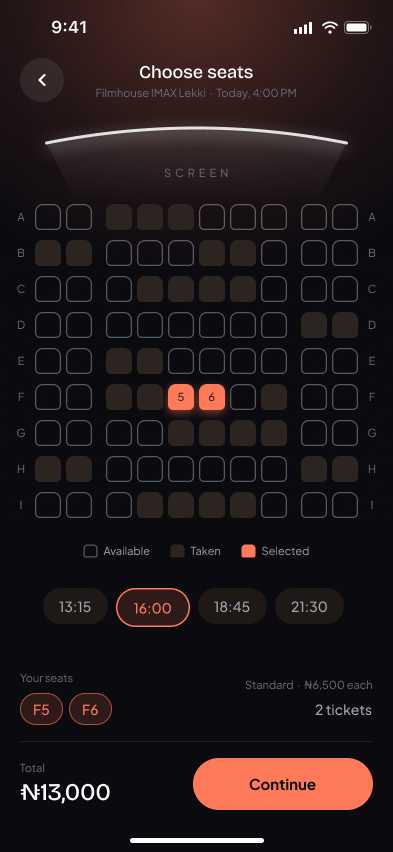
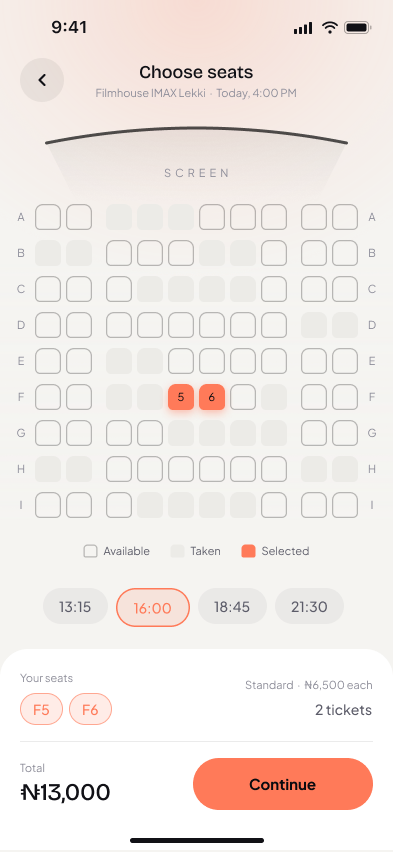
02 Choose seats
A full seat map with your choice in coral.
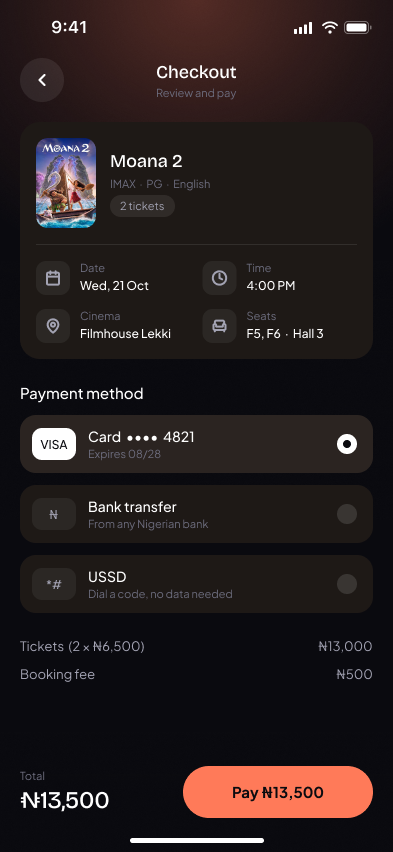
03 Pay
One summary card, three payment options, one button.
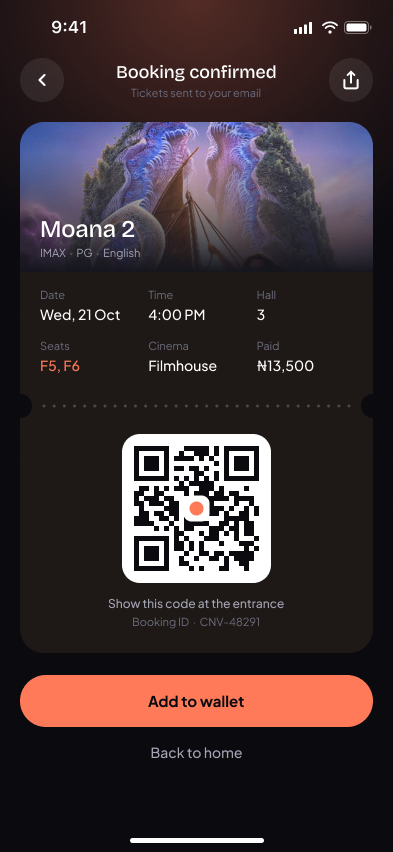
04 Get your ticket
A QR code you can show at the door or add to your wallet.
09 — Seat selection
Know your seat at a glance.
Free
An empty outline reads as “open”, even in greyscale.
Taken
Filled but muted, so it fades into the background.
Yours
The only colour on the map, with the seat number on it.
Also on this screen: a curved screen with soft light spill so you know which way you’re facing, aisles that split each row 2–6–2 like a real hall, a quick time switcher, and a panel where your seats and total update as you tap.
10 — Ticket
A ticket that feels like a ticket.
Torn-edge card
Notches and a dotted tear line split the details from the code.
Big, high-contrast QR
Easy to scan in a dark lobby. The booking ID sits just below as a backup.
Everything at the door
Date, time, hall, seats and cinema in one glance. Seats stay coral.
11 — Light mode
Every screen, both modes.
All seven screens of the flow, Dark and Light side by side — same layout, same tokens, just a mode switch.
Dark mode
Light mode
12 — Reflection
What I’d take with me.
01
Restraint is a feature
Every accent I removed made the remaining ones work harder. The best fix was usually deleting something.
02
Let the content lead
Swapping one poster changed the mood of the whole app more than any colour tweak did.
03
Design states, not screens
The seat map only works because free, taken and selected were designed together as one system.
Next steps
- Test the seat map with real people on small phones
- Add snacks and drinks to checkout
- Group booking with split payments
- Run a full accessibility and contrast check